
View Kaltura Video Analytics
When you embed Kaltura videos in your Canvas courses using the Embed Kaltura Media tool, you can view analytics to see who has watched your video, number of views, and how much they watched.
Access Kaltura Video Analytics via My Media page
- Log into Kaltura at . View Kaltura Login instructions if needed.
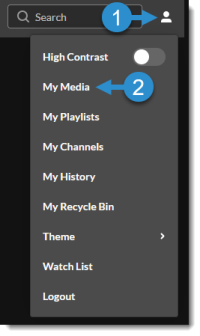
Navigate to your My Media page by clicking the User icon in the top right corner, and then selecting My Media from the drop-down menu. All of your videos will be listed on this page.
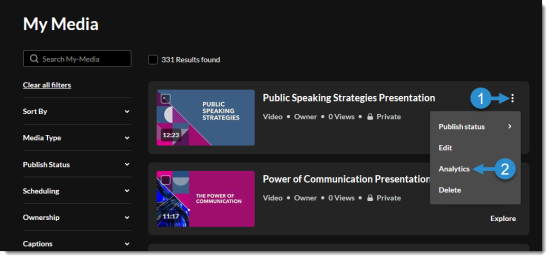
- Locate the desired video, then click on the kebab icon (three dots) to the right to view the options menu.
Select Analytics from the menu.
Access Kaltura Analytics via Video page
You can also access analytics from a video page.
- Navigate to the desired video page.
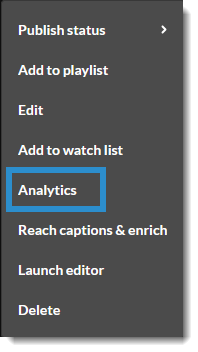
Below the video player, click on the kebab icon (three dots) to expand the action menu.

Select Analytics from the menu.
View Analytics
The following are some of the common tools that instructors may wish to use within Kaltura Analytics. More detailed information about viewing and interpreting video analytics is available in .
Set Date Range
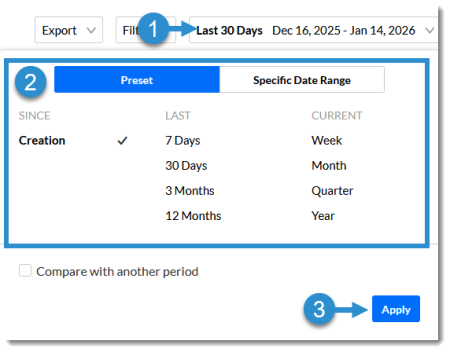
From the Analytics page, you can view a variety of analytics about your video on this page. Use the menu in the top right corner to select the date range for which you'd like to view statistics and click Apply.
View Individual Viewer Data
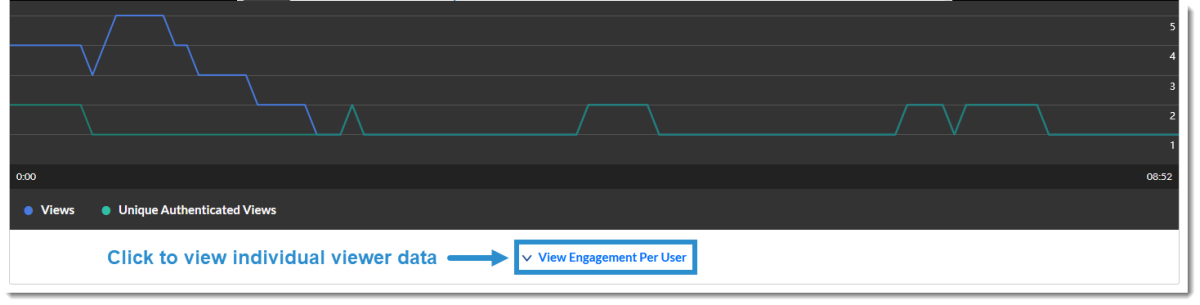
To see which users have watched the video, scroll down under the embedded video and click the ���View Engagement Per User��� link. You will be able to see who has viewed the video, how many times they viewed it, and how much of the video they viewed.
View Quiz Results
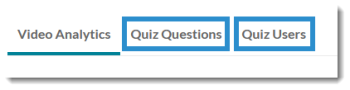
If you have a Kaltura Video Quiz, you can view the aggregate and individual results in the Video Analytics. Navigate to the Analytics page, then click on the Quiz Questions tab to view aggregate results by question or the Quiz Users tab to view individual submissions and scores.
Updated January 2026